


The best iPhone accessories for most people are a MagSafe charger, a slim magnetic power bank, a USB-C cable and a good case. Start there, then add a tripod, gimbal or AirTag if you shoot video or lose things often. Below are 15 picks, with prices checked on each maker’s site in November 2026.

Quick picks: best iPhone accessories at a glance
| Accessory | Best for | Price (Nov 2026) |
|---|---|---|
| Apple MagSafe Charger | Fast wireless charging at home | $39 (1 m) / $49 (2 m) |
| Anker Nano Power Bank (5K, MagGo, Slim) | A slim battery that snaps on | $54.99 |
| DJI Osmo Mobile 8 | Smooth handheld video | From $149 |
| AirTag (2nd generation) | Finding keys and bags | $29 / $99 for four |
| JOBY GripTight ONE Micro Stand | A pocket stand for video calls | Varies by retailer |
| Peak Design Mobile Tripod | A wallet-thin tripod | $79.95 |
| Apple EarPods (USB-C) | Cheap wired earphones | $19 |
| Anker Power Bank (10K, Fusion) | Charger and battery in one | $52.99 |
| Apple 60W USB-C Charge Cable (1 m) | A spare cable for USB-C iPhones | $19 |
| OtterBox Frē Series | Waterproof protection | $99.99 |
| OtterBox Defender Series Pro | Maximum drop protection | $69.99 |
| ESR HaloLock Ring Stand | Grip and kickstand | $19.99 |
| Spigen Ultra Hybrid (MagFit) | A clear MagSafe case | $44.99 |
| Apple 40W Dynamic Power Adapter | A fast wall charger | $39 |
| Belkin UltraCharge Pro 3-in-1 Dock | Charging iPhone, Watch and AirPods together | $149.95 at Apple |
Prices are US list prices from Apple and each brand’s own store. Case prices are for the iPhone 17 versions; other sizes can differ.
15 best iPhone accessories in 2026
1. Apple MagSafe Charger: best everyday wireless charger

The MagSafe Charger snaps onto the back of an iPhone 12 or later and lines up the charging coil for you. Apple’s MagSafe Charger page says it charges at up to 25W with a 30W adapter on iPhone 16 models and later, or up to 15W on iPhone 12 and later with a 20W adapter.
It is certified for Qi2 25W and Qi, so it also charges AirPods cases with wireless charging. You can keep using the phone while it charges, which is handy at a desk.
- Price (checked November 2026): $39 for 1 m, $49 for 2 m
- Works with: iPhone 12 and later for magnetic charging; iPhone 8 and later at up to 7.5W
- Limitation: no power adapter in the box
Pros
- Fast charging
- Secure connection
- Works with Qi-compatible devices
- Compact and portable design
Cons
- Expensive
- Not compatible with older iPhones
- Can be difficult to remove from the iPhone
2. Anker Nano Power Bank (5K, MagGo, Slim): best magnetic battery pack
Apple stopped selling its MagSafe Battery Pack in 2023, so a Qi2 power bank is the practical replacement. Anker’s Nano Power Bank (5K, MagGo, Slim) holds 5,000mAh, snaps on magnetically and charges at up to 15W wirelessly, or 20W over USB-C.
If you own an iPhone Air, Apple’s own iPhone Air MagSafe Battery ($99) is the slimmer choice, but Apple lists it as compatible with iPhone Air only.
- Price (checked November 2026): $54.99 at Anker
- Works with: MagSafe iPhones (iPhone 12 and later)
- Limitation: 5,000mAh is a top-up, not a full extra day for larger iPhones
Pros
- Thin enough to leave on the phone
- Qi2 magnetic alignment
- 15W wireless and 20W USB-C charging
Cons
- Small 5,000mAh capacity
- Adds weight to the phone
- Wireless charging is less efficient than a cable
3. DJI Osmo Mobile 8: best gimbal for smooth iPhone video
A gimbal keeps footage steady while you walk, and the DJI Osmo Mobile 8 adds 360-degree pan rotation and a built-in extension rod and tripod. It supports Apple DockKit, so it can track people in the iPhone Camera app and other DockKit apps without the DJI Mimo app.
DJI quotes up to 10 hours of battery life, and the gimbal can charge your phone over USB-C. It replaces the DJI OM 4 we listed before, which DJI no longer sells.
- Price (checked November 2026): from $149 at the DJI Store (Advanced Tracking Combo)
- Works with: phones 6.9 to 10 mm thick and 170 to 300 g, per DJI
- Limitation: DockKit tracking needs iPhone 12 or later on iOS 18.5 or later, excluding iPhone SE (3rd generation) and iPhone 16e
Pros
- 3-axis stabilisation with 360-degree pan
- Apple DockKit tracking in the Camera app
- Built-in extension rod and tripod
Cons
- Bulky compared with a mini tripod
- Pet tracking needs the separate Multifunctional Module
- Large phone cases may push past the 10 mm limit
4. AirTag (2nd generation): best for finding keys and bags

AirTag shows where your keys, bag or luggage is in the Find My app. Apple’s January 2026 announcement says the second-generation model has a louder speaker and Precision Finding that works from up to 50 percent farther away than the original.
It still runs on a replaceable CR2032 coin cell. Precision Finding now also works on Apple Watch Series 9 or later. If you misplace the phone itself rather than your keys, see our guide on how to find a lost iPhone.
- Price (checked November 2026): $29 for one, $99 for a four-pack
- Works with: iPhone with iOS 26 or later
- Limitation: no built-in loop, so you need a key ring or holder
Pros
- Small and lightweight design
- Easy to use
- Long battery life
- Water resistant
- Works with the Find My app
Cons
- Can be easily lost
- Requires an iPhone to use
- Can be expensive
5. JOBY GripTight ONE Micro Stand: best pocket stand
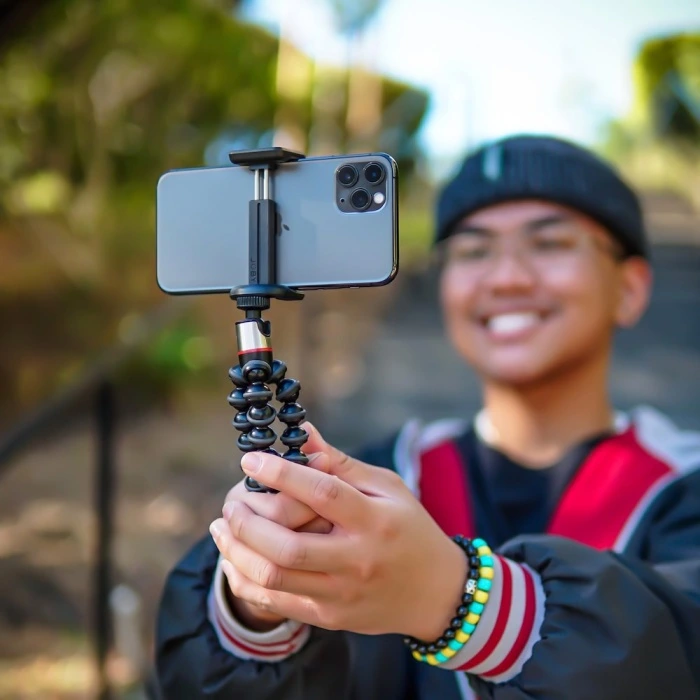
The GripTight ONE Micro Stand is a tiny folding stand with a spring clamp that holds a phone upright for video calls, recipes or timed group photos. It folds flat enough for a jacket pocket.
The clamp has a standard tripod thread, so you can also mount the phone on a full-size tripod later.
- Price: varies by retailer; we could not confirm a current list price from JOBY in November 2026
- Works with: most phones, including in a slim case
- Limitation: short legs, so it only works on a flat table
Pros
- Small and portable design
- Compatible with most smartphones and tablets
- Spring-loaded mount for easy attachment and removal
- Ball head for adjusting the angle of your device
- Durable construction
Cons
- Can be difficult to balance your device on the stand
- Not as stable as some other stands
6. Peak Design Mobile Tripod: best slim tripod

Peak Design’s Mobile Tripod folds to about half a centimetre thick and stays on the back of your phone. Its legs unfold into a small tripod or a stand, and the ball head lets you tilt the phone.
According to Peak Design, it attaches with MagSafe-compatible magnets and also works with MagSafe phones and cases. It pairs well with our tips for live streaming on an iPhone.
- Price (checked November 2026): $79.95 at Peak Design
- Works with: MagSafe iPhones and cases; other phones need Peak Design’s Universal Adapter (sold separately)
- Limitation: low height, so it is not a replacement for a full tripod
Pros
- Portable and lightweight design
- Durable construction
- Magnetic base for easy attachment to MagSafe cases
- Ball head for adjusting the angle of your iPhone
- Can be used with other devices, such as action cameras and small drones
Cons
- Expensive
- Not as stable as some larger tripods
- The magnetic base can be weak if the surface is not smooth
7. Apple EarPods (USB-C): best cheap wired earphones
iPhones no longer have a headphone jack or EarPods in the box. Apple’s EarPods with a USB-C connector plug straight into an iPhone 15 or later and include an in-line remote for volume, calls and playback.
They are a useful backup for flights, calls when AirPods are flat, or for anyone who prefers a cable.
- Price (checked November 2026): $19 at Apple
- Works with: iPhone 15 and later, iPad and Mac with USB-C
- Limitation: no noise cancellation and an open fit that leaks sound
Pros
- Cheap and light
- In-line remote and microphone
- No charging or pairing
Cons
- No noise cancellation
- Fit does not suit every ear
- Cable can tangle
8. Anker Power Bank (10K, Fusion, Built-In Cable): best 2-in-1 charger and battery
This Anker unit is a 10,000mAh power bank with fold-out wall prongs, so it also works as a wall charger. It has a built-in USB-C cable that doubles as a strap, a USB-C port and 30W two-way charging.
There is also a version with a built-in Lightning cable for iPhone 14 and earlier. It takes the place of the older Anker PowerCore 10000 PD we listed before.
- Price (checked November 2026): $52.99 at Anker
- Works with: USB-C iPhones, iPads and small laptops
- Limitation: heavier than a magnetic battery at about 0.55 lb
Pros
- Wall charger and power bank in one
- Built-in USB-C cable
- 30W fast charging
Cons
- Bulkier than a slim magnetic pack
- No wireless charging
- US plug only on the US model
9. Apple 60W USB-C Charge Cable (1 m): best spare cable
Every iPhone since the iPhone 15 uses USB-C, so one woven USB-C to USB-C cable now charges your iPhone, iPad, AirPods and many Macs. Apple’s 1 m cable supports up to 60W of power.
If you have an iPhone 14 or earlier, buy Apple’s USB-C to Lightning cable instead. For charging habits that keep the battery healthy, see our guide to maintaining iPhone battery health.
- Price (checked November 2026): $19 at Apple
- Works with: iPhone 15 and later and other USB-C devices
- Limitation: USB 2 data speeds, slow for large file transfers
Pros
- Woven, tangle-resistant design
- Up to 60W charging
- One cable for most Apple devices
Cons
- Short 1 m length
- Slow USB 2 data transfer
- No adapter included
10. OtterBox Frē Series: best waterproof case

The LifeProof FRĒ case is now sold as the OtterBox Frē Series. It seals the whole phone, including a built-in screen protector, and OtterBox rates the iPhone 17 Frē Series IP68 for up to 2 meters for up to one hour.
It has built-in MagSafe magnets, so chargers and wallets still attach. It is a good pick for beach trips, boating or kayaking.
- Price (checked November 2026): $99.99 at OtterBox for iPhone 17
- Works with: model-specific; buy the version for your iPhone
- Limitation: the built-in screen protector changes how the display feels to touch
Pros
- Waterproof up to 6.6 feet for up to 60 minutes
- Dustproof
- Shockproof
- Compatible with wireless charging
- Easy to install and remove
- Lifetime warranty
Cons
- Expensive
- Bulky
- Can make your phone feel heavy
- Not compatible with all accessories
11. OtterBox Defender Series Pro: best rugged case

Defender Series Pro is OtterBox’s toughest MagSafe-compatible case, with shock-absorbing corners and port covers to keep dust out. It suits building sites, warehouses or anyone who drops their phone a lot.
The trade-off is bulk: it adds noticeable thickness and weight to the phone.
- Price (checked November 2026): $69.99 at OtterBox for iPhone 17
- Works with: model-specific, with MagSafe on recent iPhones
- Limitation: too thick for many car mounts and slim pockets
Pros
- Rugged and protective
- Built-in screen protector
- Port covers to keep out dust and dirt
- Compatible with wireless charging
- Easy to install and remove
- Lifetime warranty
Cons
- Expensive
- Bulky
- Can make your phone feel heavy
- Not compatible with all accessories
12. ESR HaloLock Ring Stand: best grip and kickstand
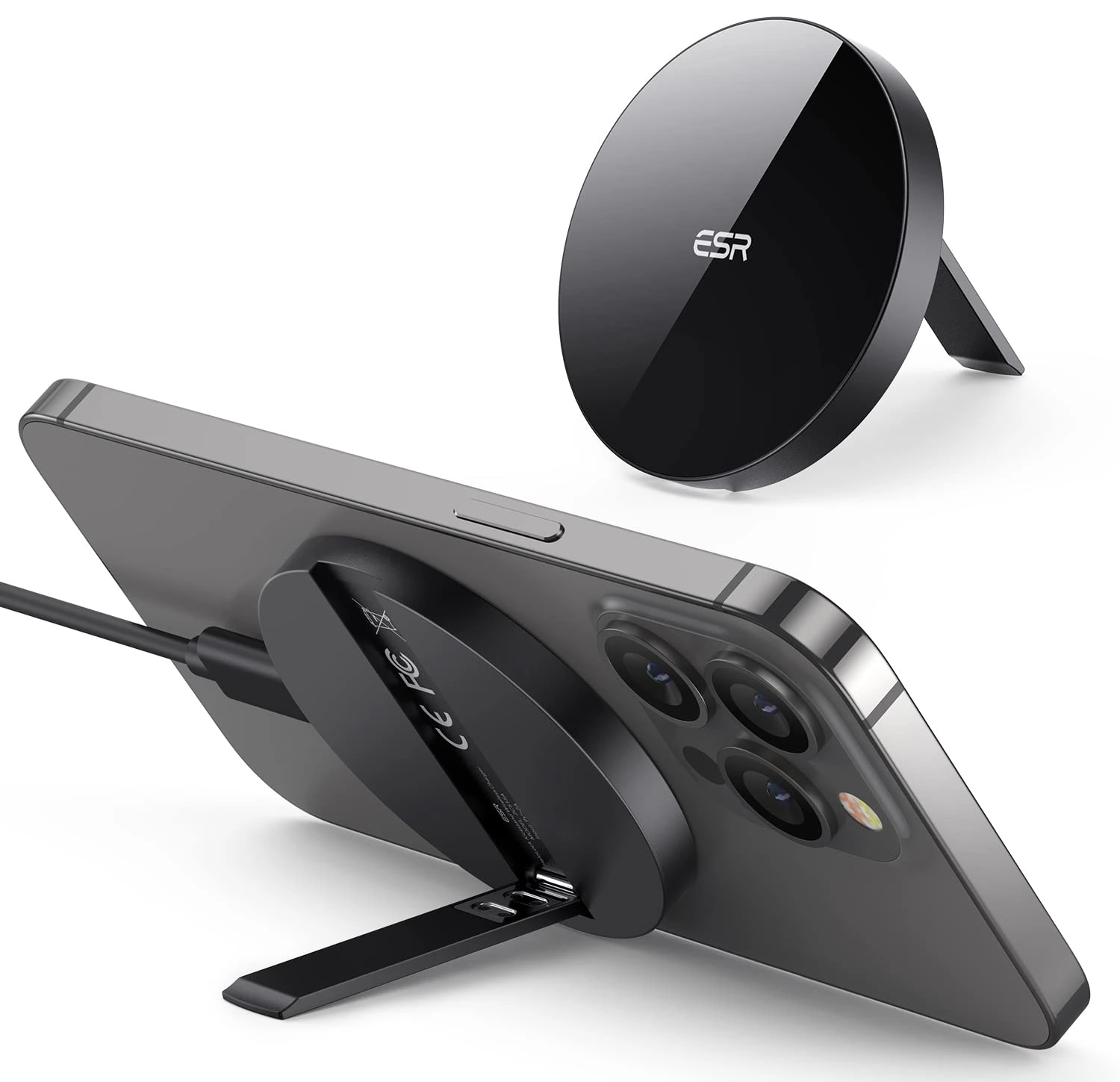
The HaloLock Ring Stand sticks to the back of a MagSafe iPhone or case and works as a finger grip or a kickstand for watching videos. It comes off in a second when you want to charge wirelessly.
It is one of the cheapest MagSafe accessories that you will use every day.
- Price (checked November 2026): $19.99 at ESR
- Works with: MagSafe iPhones and MagSafe cases
- Limitation: must be removed before wireless charging
Pros
- Magnetic attachment makes it easy to attach and remove
- Compatible with MagSafe cases
- Durable construction
- Adjustable kickstand
- Affordable
Cons
- Only compatible with MagSafe cases
- Can be bulky for some people
- Not as sturdy as some other kickstands
13. Spigen Ultra Hybrid (MagFit): best clear case

If you want to show off your iPhone’s colour, the Ultra Hybrid (MagFit) is a clear hard back with a flexible bumper and built-in MagSafe magnets. Spigen describes it as protection from everyday drops rather than rugged use.
Raised edges around the screen and camera help when the phone is placed face down. For more case shops, see our list of websites to buy iPhone and iPad covers.
- Price (checked November 2026): $44.99 at Spigen for iPhone 17
- Works with: model-specific, with MagSafe built in
- Limitation: less drop protection than a rugged case
Pros
- Clear design shows off the original look of your iPhone
- Made of durable TPU and PC materials
- Built-in MagSafe ring for attaching accessories
- Compatible with wireless charging
- Affordable
Cons
- Not as protective as some other cases
- The MagSafe ring can be bulky for some people
- Can yellow over time
14. Apple 40W Dynamic Power Adapter: best wall charger
New iPhones ship with only a cable, so most people need a wall charger. Apple’s 40W Dynamic Power Adapter with 60W Max is a compact USB-C charger that can supply up to 60W when needed.
It is enough for the MagSafe Charger’s 25W mode, which Apple says needs a 30W or higher adapter, and it can also charge an iPad or MacBook Air.
- Price (checked November 2026): $39 at Apple
- Works with: any USB-C cable or MagSafe Charger
- Limitation: single port and cable sold separately
Pros
- Compact for its power
- Fast enough for 25W MagSafe
- Can charge a MacBook Air
Cons
- One USB-C port only
- No cable included
- Costs more than many third-party chargers
15. Belkin UltraCharge Pro 3-in-1 Magnetic Charging Dock: best bedside charger
This Belkin dock charges an iPhone, Apple Watch and AirPods at the same time. Apple’s store lists it with Qi2 25W charging for compatible iPhones and includes a 45W power adapter and cable in the box.
It replaces the older Belkin MagSafe 3-in-1 we listed before. It is the tidiest option for a nightstand where you charge everything overnight.
- Price (checked November 2026): $149.95 at Apple
- Works with: MagSafe iPhones, Apple Watch and AirPods with wireless charging
- Limitation: expensive compared with separate chargers
Pros
- Charges three devices at once
- Qi2 25W for compatible iPhones
- Power adapter included
Cons
- Expensive
- Takes desk space
- Fixed design, not made for travel
How to choose the right iPhone accessories
- Check your port. iPhone 15 and later use USB-C. iPhone 14 and earlier use Lightning.
- Check MagSafe. Magnetic chargers, stands and batteries need iPhone 12 or later, or a MagSafe case.
- Check the wattage. 25W MagSafe charging needs a compatible iPhone and a 30W or higher adapter.
- Buy cases for your exact model. An iPhone 17 case will not fit an iPhone 17 Pro.
Frequently asked questions
Does Apple still sell the MagSafe Battery Pack?
No. Apple discontinued the original MagSafe Battery Pack in 2023. Its current iPhone Air MagSafe Battery works only with iPhone Air, so other iPhones need a Qi2 magnetic power bank from brands like Anker or Belkin.
Do MagSafe accessories work with a case on?
Yes, if the case has built-in MagSafe magnets, like the Spigen Ultra Hybrid (MagFit) or OtterBox cases with MagSafe. A thick case without magnets weakens the hold and can stop wireless charging.
Is wireless charging bad for an iPhone battery?
Apple designs iPhones to charge safely on Qi and MagSafe chargers, and Optimized Battery Charging limits time spent at full charge. Wireless charging can make the phone warmer than a cable, so take off a thick case if it gets hot.
Which iPhones can charge at 25W with MagSafe?
Apple lists 25W MagSafe charging for iPhone 16 models and later, iPhone Air and newer models, using the current MagSafe Charger and a 30W or higher adapter. iPhone 12 to 15 charge at up to 15W.
Do iPhone accessories work with Android phones?
Many do. USB-C cables, chargers, stands and gimbals work across brands. MagSafe accessories only attach magnetically to Android phones with Qi2 magnets or a magnetic case, and AirTag needs an iPhone to set up.
If you buy just two things from this list, get the MagSafe Charger and a 30W or higher USB-C adapter. Add a slim magnetic battery if you travel, and a case made for your exact model.