


Keeper Security is a zero-knowledge password manager with strong iPhone, Mac and browser apps. Personal plans start at $42.99/year for Keeper Unlimited and $91.99/year for Family (prices from Keeper’s site and help centre, checked November 2026). It fits people who want AES-256 vaults, Face ID sign-in and optional BreachWatch, but Apple’s built-in Passwords app is free if your needs are light.
Keeper Security at a glance
- Best for: individuals and families who want cross-platform vaults, sharing and dark-web add-ons beyond Apple Passwords
- Price (checked November 2026): Unlimited $42.99/year; Family $91.99/year (5 vaults); business plans from about $2-$6 per user/month billed annually
- Works on: iPhone, iPad, Mac, Windows, Android and browsers via KeeperFill
- Our take: a solid paid vault with clear sharing tools; BreachWatch and some storage sit behind add-ons, so budget more than the base sticker
Who Keeper is for (and who should skip it)
Pick Keeper if you sync passwords across Apple and non-Apple devices, need one-time share links, emergency access for family, or business admin controls. Skip the paid plan if you only use Apple devices and iCloud Keychain / Passwords already covers your logins. Compare options in our best password managers for macOS guide and our passkeys on iPhone explainer.
How Keeper works
You create a master password (and ideally turn on two-factor authentication). Vault data is encrypted with AES-256; Keeper markets a zero-knowledge design so plaintext secrets stay off their servers. On iPhone you can sign in with Face ID or Touch ID after setup. KeeperFill autofills in Safari and other browsers when the extension or app integration is enabled.
Key Keeper features
Emergency access for trusted contacts

Emergency Access lets you designate people who can request vault access after a waiting period you choose. Useful for family estates; set the wait long enough that you can deny a mistaken request.
One-time share links for single records

One-Time Share creates a time-limited link to one record without adding someone to your plan permanently. Handy for sending a Wi-Fi password to a guest.
Record types beyond simple logins

Keeper supports structured records for payments, identities, secure notes and other types so you are not dumping everything into a blank note.
KeeperFill autofill

KeeperFill fills usernames and passwords in the browser. On iPhone, also enable Autofill Passwords under Settings → General → AutoFill & Passwords and allow Keeper alongside or instead of other sources.
Trash Bin for deleted records

Deleted items go to Trash so you can restore mistakes. Empty Trash when you are sure a credential should disappear from devices.
BreachWatch dark web monitoring

BreachWatch is Keeper’s paid add-on that watches for exposed credentials on the dark web and nudges you to change weak or breached passwords. Factor this into cost; it is not always bundled in the base Unlimited plan.
Importing passwords and security audit

Importer tools pull from browsers and other managers. Security Audit highlights weak, reused or stale passwords so you can rotate them. Import, then turn on a passkey or 2FA where sites support it.
Add-ons and KeeperChat

Secure File Storage and BreachWatch appear as add-ons on personal plans. Family includes 10 GB file storage per Keeper’s pricing page. KeeperChat is a separate encrypted messaging product in the Keeper family; most password users can ignore it unless they need that chat tool.
Keeper on iPhone and Mac

The iOS app supports biometric sign-in, autofill and offline access to cached records after you have signed in. On Mac, use the desktop app plus browser extension. Keeper also sells business tiers with SSO and admin tooling if you outgrow personal plans.
Keeper pricing (checked November 2026)
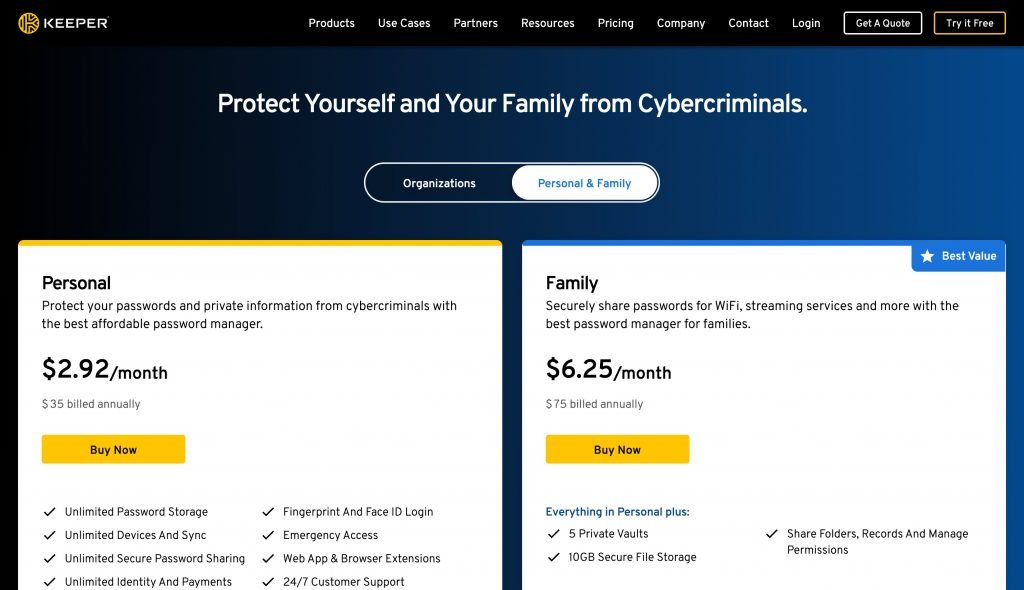
Consumer prices from Keeper’s personal pricing page and Keeper help article 158:
- Keeper Unlimited: $42.99/year (about $3.58/month billed annually) , unlimited passwords, devices, sharing, emergency access
- Keeper Family: $91.99/year (about $7.67/month) , five private vaults plus 10 GB secure file storage
- Add-ons: BreachWatch and extra Secure File Storage sold separately on many personal plans
- Business: Business Starter from about $2/user/month, Business about $4, Enterprise about $6 (annual billing; confirm on Keeper’s business page)
- Trials: Keeper advertises a 30-day consumer trial and a shorter business trial
Older on-site “30% off” offer boxes quoted lower yearly prices. Those figures are outdated; use the live Keeper checkout (or our Keeper affiliate link) for the current number. We are not restating a discount we have not verified today.
Pros and cons
What Keeper does well
- Cross-platform apps with biometric sign-in on iPhone
- Useful sharing: Family vaults, One-Time Share, Emergency Access
- Clear record types and import tools
- Business path if you later need SSO and admin controls
Where Keeper falls short
- Base price rose versus older promotional posts; BreachWatch often costs extra
- Another subscription if Apple Passwords already meets your needs
- Feature surface (Chat, PAM, add-ons) can feel busy for simple personal use
- You must protect the master password; five wrong attempts can wipe local device data per Keeper’s own docs
Alternatives
- Apple Passwords / iCloud Keychain: free on Apple devices; start here if you never leave the ecosystem
- 1Password / Bitwarden: common cross-platform peers covered in the macOS password managers guide above
- Passkeys: prefer passkeys where sites support them , guide: passkeys on iPhone
Frequently asked questions
Is Keeper safe?
Keeper uses AES-256 encryption and describes a zero-knowledge architecture. No manager is immune to phishing of your master password or device malware, so use a strong master password and 2FA.
Can Keeper be hacked?
Any online service can be targeted. Keeper’s model encrypts vault data so a server breach should not expose plaintext passwords. Still monitor BreachWatch or haveibeenpwned-style alerts for your email.
Does Keeper work with Face ID on iPhone?
Yes. After you set a master password, you can sign in with Face ID or Touch ID on supported iPhones.
How much is Keeper Family?
Keeper lists Family at $91.99 per year for five private vaults (checked November 2026). Confirm on keepersecurity.com before buying.
Should I use Keeper or Apple Passwords?
Use Apple Passwords if you only need Apple-device sync. Choose Keeper when you need Windows/Android, advanced sharing, emergency access or business admin features.
Keeper is worth the yearly fee when you need cross-platform sharing and audit tools that Apple Passwords does not offer. If you already live inside iCloud Keychain and passkeys, keep your money and tighten those settings instead.